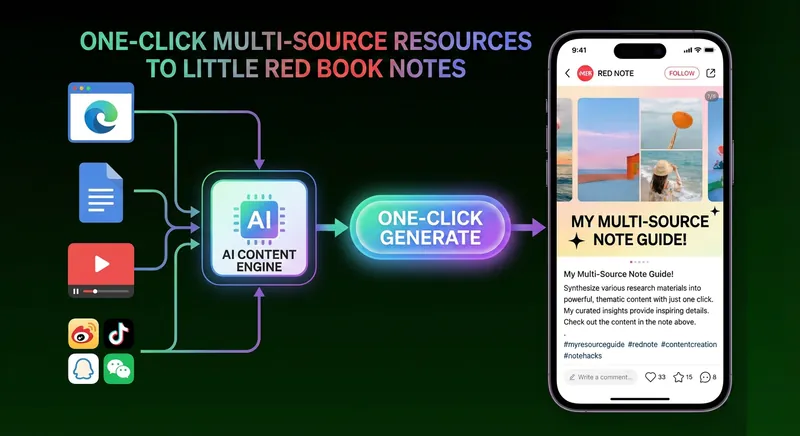
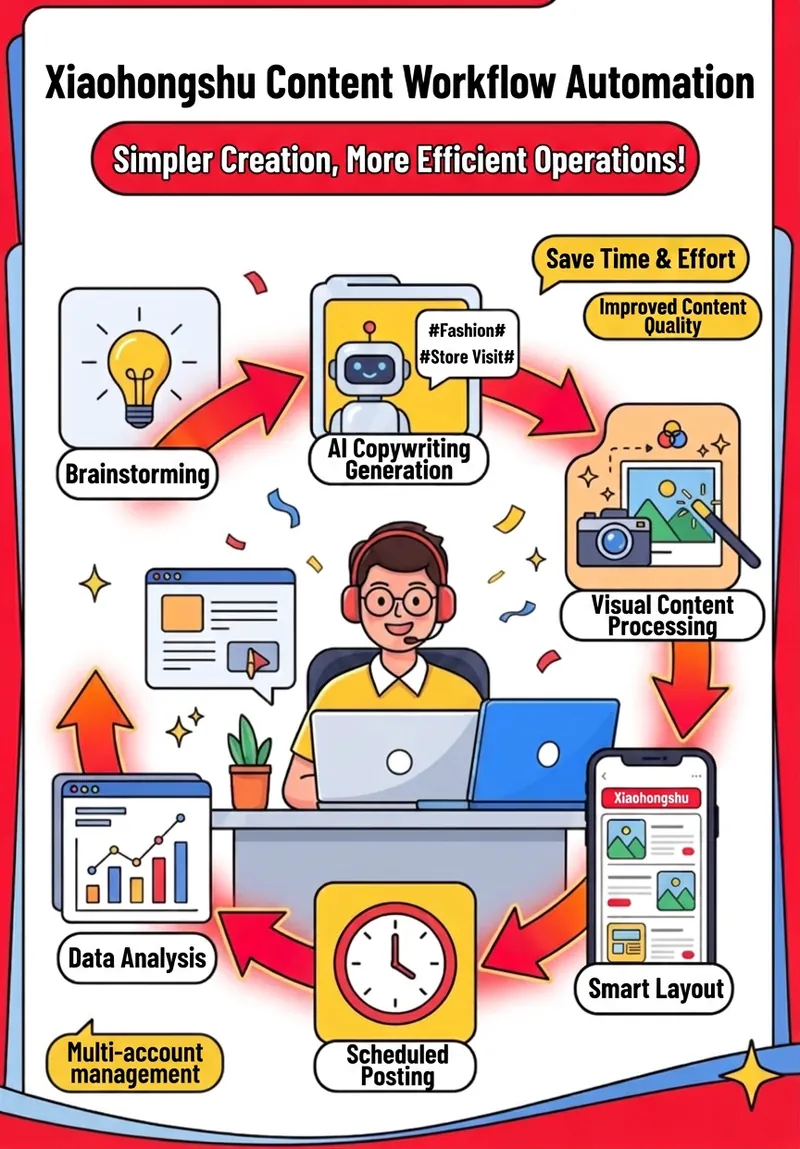
The complete production process from long articles to Xiaohongshu (Little Red Book) graphic notes
Version: v1.0 Creation Date: 2026-02-07 Applicable Scenarios: Converting long articles/tweets into Xiaohongshu image and text notes. Version 2.0 Creation Date: 2026-02-08 Adjusted the constraint on the number of key insights.
Featured by
Lynne Lau
Why we love this skill
This skill can intelligently extract lengthy articles into viral image-text notes on Xiaohongshu, adhering to Xiaohongshu platform guidelines throughout the entire process, from insight extraction and title generation to cover and content image design. It not only ensures a consistent visual style and accurate content but also generates various copywriting options, helping you easily create highly interactive and widely shareable high-quality content, achieving a leap in content creation efficiency.
Author
Gavin Cheung
Categories
Instructions
## I. Triggering Conditions
Use this skill when a user makes the following request:
- "Make this article a Xiaohongshu (Little Red Book) post with images and text."
- "Generate Xiaohongshu Notes"
- Extract key insights from this long article and turn them into images.
- "Create a set of Xiaohongshu (Little Red Book) image and text content"
---
## II. Core Workflow
### Phase 1: Content Extraction (Essential Insights Extraction)
**Objective:** To condense a long article into 8-10 independent key insights.
**Execution Steps:**
1. **In-depth reading of the original text**
- Understanding the core value of the article
- Identify unique insights
- Mark key data
2. **Extracting Insights**
- Quantity: No more than 10 points (not necessarily 10 points, but 10 concise points; if it can be explained in three points, it should not exceed four points).
- Principle: Each point can be written independently.
- Require:
- Retain all key data (numbers, percentages, times, etc.)
- Extract unique insights, avoid generalities.
- Each insight includes: core data/case study + key takeaway summary
- Form easy-to-understand output
3. **Structured Output**
plaintext
## Insight 1: [Short Title]
[Core Data/Case Studies]
[Key Insights]
## Insight 2: [Short Title]
...
```
4. **User Feedback Iteration**
- Allow users to review and gain insights into the content.
- Modified based on user feedback
- **Key point:** Avoid "dad-like" expressions.
- ❌ “This reveals…”, “This embodies…”, “This demonstrates…”
- ✅ Use a conversational style, short sentences, and direct expression
---
### Phase 2: Title Generation (Xiaohongshu Viral Titles)
**Objective:** Generate a cover title that conforms to Xiaohongshu's guidelines.
**Xiaohongshu Title Guidelines:**
- 20 characters or less (including punctuation)
- It's essential to leave the answer ambiguous and not give a definitive answer.
- Broaden the scope of topics, avoiding narrow terms such as "self-media" and "paid knowledge".
- Tension: Contrast/Numbers/Suspense/Conflict, at least 2 items
**Heading Type Distribution:**
- Data + Discovery type: 20-30%
- Cognitive conflict type: 20-30%
- Key phrase type: 15-25%
- Comparative type: 10-20%
- Question-based approach: 10-20% (do not exceed 30%)
**Generation Process:**
1. Extract materials (data, time, people, memorable quotes, cognitive conflict)
2. Generate 5 candidate titles, each using a different template.
3. Review guidelines (word count, suspense, tension)
4. Let users choose the best title.
**Important Notes:**
- Avoid brand names (if they are not well-known in China).
- The numbers need to be impactful
- Create a sense of contrast
---
### Phase 3: Cover Design (Three-layer Content Structure)
**Objective:** Design a cover that aligns with Xiaohongshu's algorithm and user habits.
**The Three-Layer Logic of Xiaohongshu Cover Design:**
1. **Main Title (To Attract User Clicks)**
- Location: Upper center of the cover
- Font Size: Largest
- Function: To create suspense and attract attention.
2. **Subtitle (Feeding Algorithm)**
- Location: Below the main title
- Font size: Medium
- Content: Contains keywords to help the algorithm identify content types.
Example: "A complete retrospective of 3 weeks of intensive AI collaboration"
- Keywords: Core themes + Content format (review/methodology/case studies, etc.)
3. **Small print content (to increase virality)**
- Location: Bottom of the cover
- Font size: Small
- Type selection:
- Data spike type: 3-4 key data points
- Pain Point Resonance Type: 2-3 user pain points
- Value Promise Type: 2-3 core value propositions
**Cover layout suggestions:**
plaintext
┌─────────────────────────┐
│ [Main Title] │ ← Largest Font Size
│ │
│ [Subtitle] │ ← Medium font size
│ │
│ [Simple Visual Elements] │ ← Hand-drawn illustrations/icons
│ │
│ ✓ [Highlight 1] │ ← Small text
│ ✓ [Highlight 2] │
│ ✓ [Highlight 3] │
│ ✓ [Highlight 4] │
└─────────────────────────┘
```
---
### Phase 4: Content Graph Generation
**Objective:** To generate visual images for each insight.
**Unified Style Requirements:**
- Ratio: 3:4 (Xiaohongshu vertical version)
- Background: Off-white #F9F7F2
- Style: Minimalist hand-drawn, pen lines
- Font: Simplified Chinese in handwriting style
- White space: Ample, not crowded
**Core Principle: Tables are worse than words, and diagrams are worse than tables.**
don't want:
- ❌ Pure text piling up
- ❌ Densely packed bullet points
- ❌ Complex charts
To do:
- ✅ Visualize data using charts (timelines, pie charts, bar charts, flowcharts)
- ✅ Use comparison images to show the differences (bubble comparison, before and after comparison)
- ✅ Simplify information with icons and symbols
- ✅ Use arrows and lines to show relationships
**Structure of each image:**
1. Title (top, handwritten)
2. Core visual (center, chart/illustration)
3. Key quotes (bottom, emphasized)
**Chart Type Selection Guide:**
- Time distribution → Timeline chart
- Compare differences → Bubble comparison chart / Left and right comparison
- Process Steps → Flowchart/Circuit Diagram
- Data proportions → Pie chart
- System Structure → Tree Diagram/Functional Diagram
- Multidimensional data → Dashboard layout
- Transformation Relationship → Arrow Transformation Diagram
---
### Phase 5: Writing the Main Content (Xiaohongshu Copywriting)
**Objective:** To write accompanying Xiaohongshu (Little Red Book) content.
**Copywriting style requirements:**
- Remove the "fatherly" tone: Avoid phrases like "revealed," "reflected," or "in conclusion."
- Use short sentences: easy to read, rhythmic.
- Vivid imagery: Using concrete scenes instead of abstract descriptions
- Include data: Interweave key data points, avoid piling them up.
- Comparison: Using case studies to illustrate the issues.
Three types of copywriting:
1. **Narrative storytelling** (Recommended)
- Beginning: Specific scenario ("Still at 2 a.m....")
- Middle: Data + Methods + Cases
- Conclusion: Summary of Key Quotes
- Word count: 400-500 words
2. **Data-driven**
- Beginning: Directly throw in the data
- Middle: Disassembly Method
- Conclusion: Key Values
- Word count: 300-400 words
3. **Pain Point Resonance Type**
- Introduction: Question/Pain Point
- Middle: Solution
- Ending: Call to Action
- Word count: 350-450 words
**Copywriting Structure Template:**
plaintext
[Beginning: Scenario/Data/Problem]
[Core Data Display]
[Methods/Case Studies]
[Key Insights]
[Key closing quote]
[Guided Swipe]: 10 Insights 👇 Swipe to view
[Topic Tags]: #CoreKeywords# Related Topics
```
**Topic tag selection:**
- 3-6 tags
- Includes: core keywords + vertical industry + trending topics
- Example: #AI tools #efficiency improvement #content creation #Xiaohongshu operations
---
## III. Quality Inspection Checklist
### Insight Extraction Inspection:
- [ ] Number of Insights: 8-10
- [ ] Each insight can be understood independently.
- [ ] retains all key data
- [ ] No "dad-like" expression
- [ ] Specific cases/comparisons are provided
### Title Check:
- [ ] ≤ 20 characters
- [ ] There's suspense, no answer given.
- [ ] has tension (numbers/contrast/conflict)
- [ ] covers a wide range of topics
- [ ] avoids narrowing words
### Cover Inspection:
- [ ] The main title is the most eye-catching
- [ ] Subtitle contains keywords
- [ ] Small print contains explosive content
- [ ] Clear visual hierarchy
- [ ] 3:4 ratio
### Content Image Check:
- [ ] 10 images with a consistent style
- [ ] are all in a 3:4 ratio
- [ ] Simplified Chinese font
- [ ] Use charts instead of plain text
- [ ] Sufficient white space
- [ ] Hand-drawn minimalist style
### Text check:
- [ ] No "fatherly" flavor
- [ ] Short sentences are the main focus
- [ ] evokes vivid imagery
- [ ] Data interspersed naturally
- [ ] contains a guide ("Slide to view")
- [ ] contains hashtags
---
## IV. Common Problems and Solutions
### Question 1: Insight extraction feels too "paternalistic".
**Symptoms:** Using analytical tones such as "This reveals..." or "We can see..."
**solve:**
- Express directly in short sentences
- Replace "In conclusion..." with "To put it simply..."
- Use a conversational tone: "You think... but actually..."
- Remove all words such as "reveal", "embody", and "display".
### Question 2: The title is not attractive enough
**Symptoms:** The title is bland and lacks appeal, failing to attract clicks.
**solve:**
- Add specific numbers
- Create a sense of contrast ("I ruined the AI")
- Asking questions without providing answers
- Avoid complete declarative sentences
### Question 3: Too much text in the images
**Symptoms:** Images resemble PowerPoint presentations, densely packed with text.
**solve:**
- Use charts instead of text lists
- Only retain core keywords
- Increase white space
- Using icons and symbols
### Question 4: The main text is too long or too short
**Symptoms:** More than 600 words or less than 300 words
**solve:**
- Optimal length: 400-500 words
- Too long: Remove duplicate content and merge similarities.
- Too short: Add specific examples or data.
---
## V. Iteration Record
### v1.0 (2026-02-07)
- Initial version
- Establish a complete five-stage workflow
- Clarify Xiaohongshu title guidelines
- Define the three-layer structure of the cover
- Establish the principle that "tables are worse than words, and diagrams are worse than tables."
---
## VI. Usage Examples
**Input:** A 3000-word article titled "Claude Code: My Three Weeks with DontbeSilent"
**Output:**
1. 10 Key Insights (Document)
2. One viral headline: "42 conversations a day on average, I've ruined my AI."
3. One cover image (3:4 aspect ratio, including main title + subtitle + 4 data points)
4. 10 content images (3:4 aspect ratio, minimalist hand-drawn style, each corresponding to an insight)
5. Three versions of Xiaohongshu content (story-based/data-based/pain point-based)
**Total:** 11 images + accompanying text, ready to publish.
---
## VII. Precautions
1. **User participation is very important.**
- After extracting insights, allow users to review and fine-tune them.
- After the title is generated, allow the user to select.
- Do not generate all of the data at once and then provide it to the user.
2. **Maintain consistency in style**
- All images must use the same visual style
- Background color, font, and white space ratio should be consistent.
- The thickness of hand-drawn lines should be consistent.
3. **Simplified Chinese is crucial.**
- Explicitly require the generation of Simplified Chinese.
- Check for any traditional Chinese characters or English text mixed in.
4. **Data is a core asset.**
- All critical data must be retained
- Data should be visualized in images.
Data should be naturally interspersed throughout the text.
5. **Avoid Brand Name Traps**
- If the brand has no recognition in the country, delete.
- Replace with a generic description ("AI Tool" instead of "Claude Code")
---
## VIII. Success Criteria
A successful Xiaohongshu (Little Red Book) post should:
- ✅ The cover title makes you want to click.
- ✅ The content images are so engaging that you'll want to scroll through them all.
- ✅ Each image can be understood independently.
- ✅ The text resonates with readers; it's not preachy.
- ✅ The data is sufficient and convincing.
- ✅ Consistent visual style, professional
- ✅ Can be published directly without secondary editing
Related Skills
View allInfographic Maker

Say goodbye to the hassle of manually creating charts. Simply provide your structured data, and Infographic Maker can generate high-quality PNG infographics with a single click. It features 6 built-in chart types (timeline, flowchart, leaderboard, scale chart, comparison chart, funnel chart) and 5 meticulously crafted visual styles (Business Blue, Creative Color, Dark Tech, Elegant Warm, Minimalist Black and White), easily covering all scenarios from annual reports to social media. Supporting Instagram Stories (9:16), Feed (4:5), and Square (1:1) sizes, it lets your data speak for itself.
Data Visualization
Generate visualizations based on user-provided data that conform to the Storytelling with Data (SWD) principle. Triggering conditions: This skill must be used when a user provides data and requests "draw a chart," "generate a chart," "visualize," "make a graph," or "show me this data," or uploads CSV/Excel/spreadsheet data and wants to see a graphical representation. Even if the user only says "analyze this data" and the data is suitable for visualization, this skill should still be used to generate a chart.
Every Classic-Modern Conflict Cover
The article's core ideas are transformed into a visual impact. The collision of classical engraving and modern symbols creates the Every.to-style cover, characterized by dark emphasis, high contrast, wordless composition, and a strong sense of artistry.
The complete production process from long articles to Xiaohongshu (Little Red Book) graphic notes
Version: v1.0 Creation Date: 2026-02-07 Applicable Scenarios: Converting long articles/tweets into Xiaohongshu image and text notes. Version 2.0 Creation Date: 2026-02-08 Adjusted the constraint on the number of key insights.
Featured by
Lynne Lau
Why we love this skill
This skill can intelligently extract lengthy articles into viral image-text notes on Xiaohongshu, adhering to Xiaohongshu platform guidelines throughout the entire process, from insight extraction and title generation to cover and content image design. It not only ensures a consistent visual style and accurate content but also generates various copywriting options, helping you easily create highly interactive and widely shareable high-quality content, achieving a leap in content creation efficiency.
Author
Gavin Cheung
Categories
images
Instructions
## I. Triggering Conditions
Use this skill when a user makes the following request:
- "Make this article a Xiaohongshu (Little Red Book) post with images and text."
- "Generate Xiaohongshu Notes"
- Extract key insights from this long article and turn them into images.
- "Create a set of Xiaohongshu (Little Red Book) image and text content"
---
## II. Core Workflow
### Phase 1: Content Extraction (Essential Insights Extraction)
**Objective:** To condense a long article into 8-10 independent key insights.
**Execution Steps:**
1. **In-depth reading of the original text**
- Understanding the core value of the article
- Identify unique insights
- Mark key data
2. **Extracting Insights**
- Quantity: No more than 10 points (not necessarily 10 points, but 10 concise points; if it can be explained in three points, it should not exceed four points).
- Principle: Each point can be written independently.
- Require:
- Retain all key data (numbers, percentages, times, etc.)
- Extract unique insights, avoid generalities.
- Each insight includes: core data/case study + key takeaway summary
- Form easy-to-understand output
3. **Structured Output**
plaintext
## Insight 1: [Short Title]
[Core Data/Case Studies]
[Key Insights]
## Insight 2: [Short Title]
...
```
4. **User Feedback Iteration**
- Allow users to review and gain insights into the content.
- Modified based on user feedback
- **Key point:** Avoid "dad-like" expressions.
- ❌ “This reveals…”, “This embodies…”, “This demonstrates…”
- ✅ Use a conversational style, short sentences, and direct expression
---
### Phase 2: Title Generation (Xiaohongshu Viral Titles)
**Objective:** Generate a cover title that conforms to Xiaohongshu's guidelines.
**Xiaohongshu Title Guidelines:**
- 20 characters or less (including punctuation)
- It's essential to leave the answer ambiguous and not give a definitive answer.
- Broaden the scope of topics, avoiding narrow terms such as "self-media" and "paid knowledge".
- Tension: Contrast/Numbers/Suspense/Conflict, at least 2 items
**Heading Type Distribution:**
- Data + Discovery type: 20-30%
- Cognitive conflict type: 20-30%
- Key phrase type: 15-25%
- Comparative type: 10-20%
- Question-based approach: 10-20% (do not exceed 30%)
**Generation Process:**
1. Extract materials (data, time, people, memorable quotes, cognitive conflict)
2. Generate 5 candidate titles, each using a different template.
3. Review guidelines (word count, suspense, tension)
4. Let users choose the best title.
**Important Notes:**
- Avoid brand names (if they are not well-known in China).
- The numbers need to be impactful
- Create a sense of contrast
---
### Phase 3: Cover Design (Three-layer Content Structure)
**Objective:** Design a cover that aligns with Xiaohongshu's algorithm and user habits.
**The Three-Layer Logic of Xiaohongshu Cover Design:**
1. **Main Title (To Attract User Clicks)**
- Location: Upper center of the cover
- Font Size: Largest
- Function: To create suspense and attract attention.
2. **Subtitle (Feeding Algorithm)**
- Location: Below the main title
- Font size: Medium
- Content: Contains keywords to help the algorithm identify content types.
Example: "A complete retrospective of 3 weeks of intensive AI collaboration"
- Keywords: Core themes + Content format (review/methodology/case studies, etc.)
3. **Small print content (to increase virality)**
- Location: Bottom of the cover
- Font size: Small
- Type selection:
- Data spike type: 3-4 key data points
- Pain Point Resonance Type: 2-3 user pain points
- Value Promise Type: 2-3 core value propositions
**Cover layout suggestions:**
plaintext
┌─────────────────────────┐
│ [Main Title] │ ← Largest Font Size
│ │
│ [Subtitle] │ ← Medium font size
│ │
│ [Simple Visual Elements] │ ← Hand-drawn illustrations/icons
│ │
│ ✓ [Highlight 1] │ ← Small text
│ ✓ [Highlight 2] │
│ ✓ [Highlight 3] │
│ ✓ [Highlight 4] │
└─────────────────────────┘
```
---
### Phase 4: Content Graph Generation
**Objective:** To generate visual images for each insight.
**Unified Style Requirements:**
- Ratio: 3:4 (Xiaohongshu vertical version)
- Background: Off-white #F9F7F2
- Style: Minimalist hand-drawn, pen lines
- Font: Simplified Chinese in handwriting style
- White space: Ample, not crowded
**Core Principle: Tables are worse than words, and diagrams are worse than tables.**
don't want:
- ❌ Pure text piling up
- ❌ Densely packed bullet points
- ❌ Complex charts
To do:
- ✅ Visualize data using charts (timelines, pie charts, bar charts, flowcharts)
- ✅ Use comparison images to show the differences (bubble comparison, before and after comparison)
- ✅ Simplify information with icons and symbols
- ✅ Use arrows and lines to show relationships
**Structure of each image:**
1. Title (top, handwritten)
2. Core visual (center, chart/illustration)
3. Key quotes (bottom, emphasized)
**Chart Type Selection Guide:**
- Time distribution → Timeline chart
- Compare differences → Bubble comparison chart / Left and right comparison
- Process Steps → Flowchart/Circuit Diagram
- Data proportions → Pie chart
- System Structure → Tree Diagram/Functional Diagram
- Multidimensional data → Dashboard layout
- Transformation Relationship → Arrow Transformation Diagram
---
### Phase 5: Writing the Main Content (Xiaohongshu Copywriting)
**Objective:** To write accompanying Xiaohongshu (Little Red Book) content.
**Copywriting style requirements:**
- Remove the "fatherly" tone: Avoid phrases like "revealed," "reflected," or "in conclusion."
- Use short sentences: easy to read, rhythmic.
- Vivid imagery: Using concrete scenes instead of abstract descriptions
- Include data: Interweave key data points, avoid piling them up.
- Comparison: Using case studies to illustrate the issues.
Three types of copywriting:
1. **Narrative storytelling** (Recommended)
- Beginning: Specific scenario ("Still at 2 a.m....")
- Middle: Data + Methods + Cases
- Conclusion: Summary of Key Quotes
- Word count: 400-500 words
2. **Data-driven**
- Beginning: Directly throw in the data
- Middle: Disassembly Method
- Conclusion: Key Values
- Word count: 300-400 words
3. **Pain Point Resonance Type**
- Introduction: Question/Pain Point
- Middle: Solution
- Ending: Call to Action
- Word count: 350-450 words
**Copywriting Structure Template:**
plaintext
[Beginning: Scenario/Data/Problem]
[Core Data Display]
[Methods/Case Studies]
[Key Insights]
[Key closing quote]
[Guided Swipe]: 10 Insights 👇 Swipe to view
[Topic Tags]: #CoreKeywords# Related Topics
```
**Topic tag selection:**
- 3-6 tags
- Includes: core keywords + vertical industry + trending topics
- Example: #AI tools #efficiency improvement #content creation #Xiaohongshu operations
---
## III. Quality Inspection Checklist
### Insight Extraction Inspection:
- [ ] Number of Insights: 8-10
- [ ] Each insight can be understood independently.
- [ ] retains all key data
- [ ] No "dad-like" expression
- [ ] Specific cases/comparisons are provided
### Title Check:
- [ ] ≤ 20 characters
- [ ] There's suspense, no answer given.
- [ ] has tension (numbers/contrast/conflict)
- [ ] covers a wide range of topics
- [ ] avoids narrowing words
### Cover Inspection:
- [ ] The main title is the most eye-catching
- [ ] Subtitle contains keywords
- [ ] Small print contains explosive content
- [ ] Clear visual hierarchy
- [ ] 3:4 ratio
### Content Image Check:
- [ ] 10 images with a consistent style
- [ ] are all in a 3:4 ratio
- [ ] Simplified Chinese font
- [ ] Use charts instead of plain text
- [ ] Sufficient white space
- [ ] Hand-drawn minimalist style
### Text check:
- [ ] No "fatherly" flavor
- [ ] Short sentences are the main focus
- [ ] evokes vivid imagery
- [ ] Data interspersed naturally
- [ ] contains a guide ("Slide to view")
- [ ] contains hashtags
---
## IV. Common Problems and Solutions
### Question 1: Insight extraction feels too "paternalistic".
**Symptoms:** Using analytical tones such as "This reveals..." or "We can see..."
**solve:**
- Express directly in short sentences
- Replace "In conclusion..." with "To put it simply..."
- Use a conversational tone: "You think... but actually..."
- Remove all words such as "reveal", "embody", and "display".
### Question 2: The title is not attractive enough
**Symptoms:** The title is bland and lacks appeal, failing to attract clicks.
**solve:**
- Add specific numbers
- Create a sense of contrast ("I ruined the AI")
- Asking questions without providing answers
- Avoid complete declarative sentences
### Question 3: Too much text in the images
**Symptoms:** Images resemble PowerPoint presentations, densely packed with text.
**solve:**
- Use charts instead of text lists
- Only retain core keywords
- Increase white space
- Using icons and symbols
### Question 4: The main text is too long or too short
**Symptoms:** More than 600 words or less than 300 words
**solve:**
- Optimal length: 400-500 words
- Too long: Remove duplicate content and merge similarities.
- Too short: Add specific examples or data.
---
## V. Iteration Record
### v1.0 (2026-02-07)
- Initial version
- Establish a complete five-stage workflow
- Clarify Xiaohongshu title guidelines
- Define the three-layer structure of the cover
- Establish the principle that "tables are worse than words, and diagrams are worse than tables."
---
## VI. Usage Examples
**Input:** A 3000-word article titled "Claude Code: My Three Weeks with DontbeSilent"
**Output:**
1. 10 Key Insights (Document)
2. One viral headline: "42 conversations a day on average, I've ruined my AI."
3. One cover image (3:4 aspect ratio, including main title + subtitle + 4 data points)
4. 10 content images (3:4 aspect ratio, minimalist hand-drawn style, each corresponding to an insight)
5. Three versions of Xiaohongshu content (story-based/data-based/pain point-based)
**Total:** 11 images + accompanying text, ready to publish.
---
## VII. Precautions
1. **User participation is very important.**
- After extracting insights, allow users to review and fine-tune them.
- After the title is generated, allow the user to select.
- Do not generate all of the data at once and then provide it to the user.
2. **Maintain consistency in style**
- All images must use the same visual style
- Background color, font, and white space ratio should be consistent.
- The thickness of hand-drawn lines should be consistent.
3. **Simplified Chinese is crucial.**
- Explicitly require the generation of Simplified Chinese.
- Check for any traditional Chinese characters or English text mixed in.
4. **Data is a core asset.**
- All critical data must be retained
- Data should be visualized in images.
Data should be naturally interspersed throughout the text.
5. **Avoid Brand Name Traps**
- If the brand has no recognition in the country, delete.
- Replace with a generic description ("AI Tool" instead of "Claude Code")
---
## VIII. Success Criteria
A successful Xiaohongshu (Little Red Book) post should:
- ✅ The cover title makes you want to click.
- ✅ The content images are so engaging that you'll want to scroll through them all.
- ✅ Each image can be understood independently.
- ✅ The text resonates with readers; it's not preachy.
- ✅ The data is sufficient and convincing.
- ✅ Consistent visual style, professional
- ✅ Can be published directly without secondary editing
Related Skills
View allInfographic Maker
Say goodbye to the hassle of manually creating charts. Simply provide your structured data, and Infographic Maker can generate high-quality PNG infographics with a single click. It features 6 built-in chart types (timeline, flowchart, leaderboard, scale chart, comparison chart, funnel chart) and 5 meticulously crafted visual styles (Business Blue, Creative Color, Dark Tech, Elegant Warm, Minimalist Black and White), easily covering all scenarios from annual reports to social media. Supporting Instagram Stories (9:16), Feed (4:5), and Square (1:1) sizes, it lets your data speak for itself.
Data Visualization
Generate visualizations based on user-provided data that conform to the Storytelling with Data (SWD) principle. Triggering conditions: This skill must be used when a user provides data and requests "draw a chart," "generate a chart," "visualize," "make a graph," or "show me this data," or uploads CSV/Excel/spreadsheet data and wants to see a graphical representation. Even if the user only says "analyze this data" and the data is suitable for visualization, this skill should still be used to generate a chart.
Every Classic-Modern Conflict Cover
The article's core ideas are transformed into a visual impact. The collision of classical engraving and modern symbols creates the Every.to-style cover, characterized by dark emphasis, high contrast, wordless composition, and a strong sense of artistry.
Find your next favorite skill
Explore more curated AI skills for research, creation, and everyday work.