
Ancestral Home Restorer
Turn oral history into memory archives and floor plans
Ancestral Home Restorer
Turn oral history into memory archives and floor plans
Showcase
Description
Want to preserve an old house that has been demolished, remodeled, or gone for your family to see? Share a memory, or attach old photos and hand-drawn sketches. First, organize rooms, doors, windows, yards, and movement routes into a memory archive, then create an openable, item-by-item verifiable floor diagram. Unclear areas are marked as pending verification; when family accounts differ, it does not choose one as true for you. The core deliverables of the initial version are the memory archive and layout diagram. Once the layout is confirmed, upon your further request and provided a complete reference image of the same version is available, you can try generating a low-quality exterior draft. Image generation may consume additional credits, and exterior drafts are not covered by the installation fee commitment, nor is exact consistency with the floor plan guaranteed. Finished outputs are for assisting family recollections and communication, not for historical photos, surveying drawings, structural appraisals, or construction references. Public examples use independently fictionalized cases only.
Why we love this skill
Rigorously organizes fragmented oral accounts, old photos, and sketches into verifiable old house memory archives and floor plans, clearly distinguishing memories, evidence, deductions, and the unknown. It prioritizes spatial confirmation before cautious exterior rendering to protect authentic memories.
Best for
Ideal for those who want to organize memories of demolished, remodeled, or vanished old houses to review and share with family.
How to use this Skill
Provide your input
Provide oral memories of the old house, and you can also attach old photos or hand-drawn sketches.
Run the Skill
The assistant organizes rooms, doors, windows, courtyards, and circulation routes, distinguishes between known, inferred, pending verification, and conflicting information, and creates a floor plan that can be verified item by item.
Review your result
Receive a family memory archive and an interactive floor plan for verification; after confirming the layout and making a separate request, you can try generating a draft exterior view.
Related Skills
View all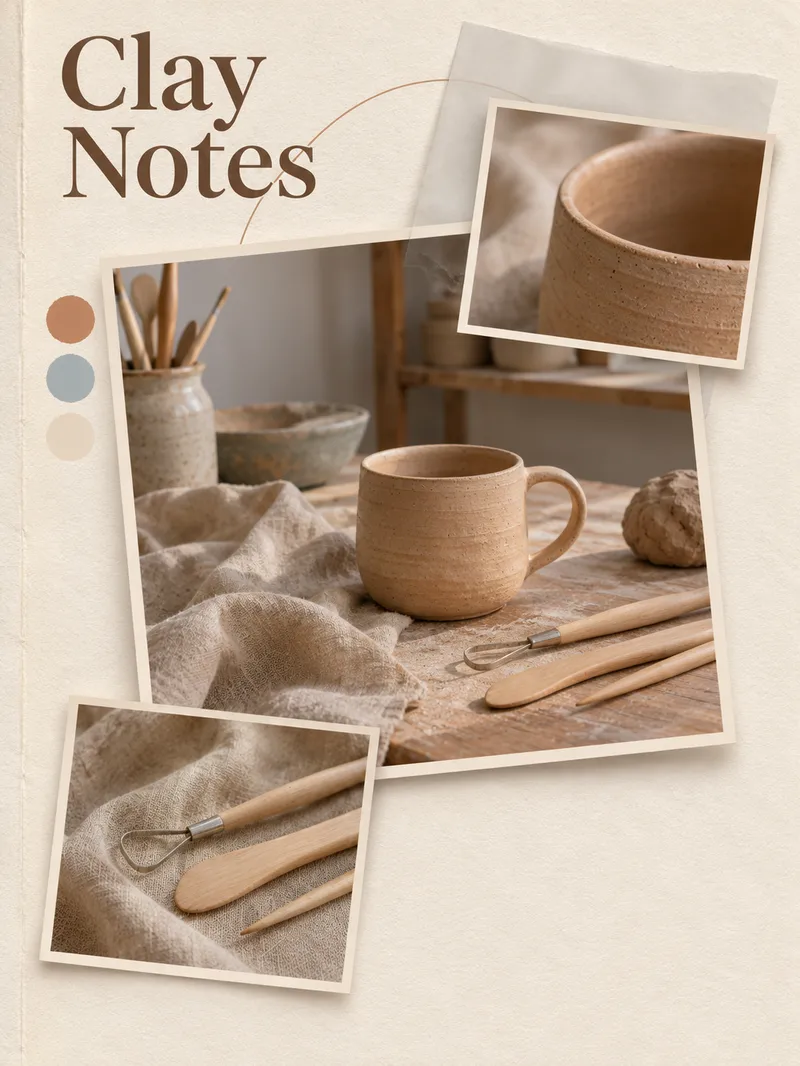 Image
Photo Print Journal
Ideal for creators who need journal-style companion images for reading, pets, still lifes, or scene themes. Provide a text theme or authorized photos, a crop range, a short title, a color scheme, and an intended use; unconfirmed dates, locations, or experiences will not be fabricated. The Skill first arranges one main image and two visible details to create a single-page three-print layout: warm white cotton paper, binding creases, offset white-bordered prints, and soft shadows, paired with a touch of tracing paper, fine curved lines, and thematic color swatches. After generating via the current image tool, it verifies the print count, subjects and props, title, and cropping, then delivers the actual poster, title, and inspection notes, with prompts provided on demand. Usage: Describe the theme and what the three prints should display, or upload authorized photos and specify elements to keep. Review the results and request edits by specific section. Photo mode organizes content based solely on readable details and does not invent new events beyond the photos. Four showcases represent fictional AI examples generated locally following the final skill workflow for November 12, 2026: Garden Reading, Coast and Straw Hat, Ginger Cat Afternoon, and Pottery Desktop; these are not real photographs, actual trips, or client projects. All four examples feature the three-print hierarchy of one main image and two details. Some color swatches are circular rather than rough small squares, and hands, print margins, and detail textures still vary. The avatar reference was generated separately from the reading example to show the actual layout direction with a large Chinese title, not as a fifth independent example. This version is an independently designed single-page three-print method that does not copy or distribute third-party photos, prompts, specific consecutive slice layouts, or attributions. GPT is recommended for text planning, and image generation depends on available image generation or editing tools. Local use relies on built-in image_gen; because the tool does not return a specific model ID, no binding to Image2 is claimed. Photo editing and YouMind operation have not been empirically tested, so identity, product structure, text, or cross-image consistency cannot be guaranteed. If image tools are unavailable, it will clearly state that image creation is incomplete. The 299 credits are the skill installation price and do not include platform model or third-party service fees; PSD or vector source files are not delivered, and automatic publishing or purchasing is not supported.
 Image
Room Corner Makeover
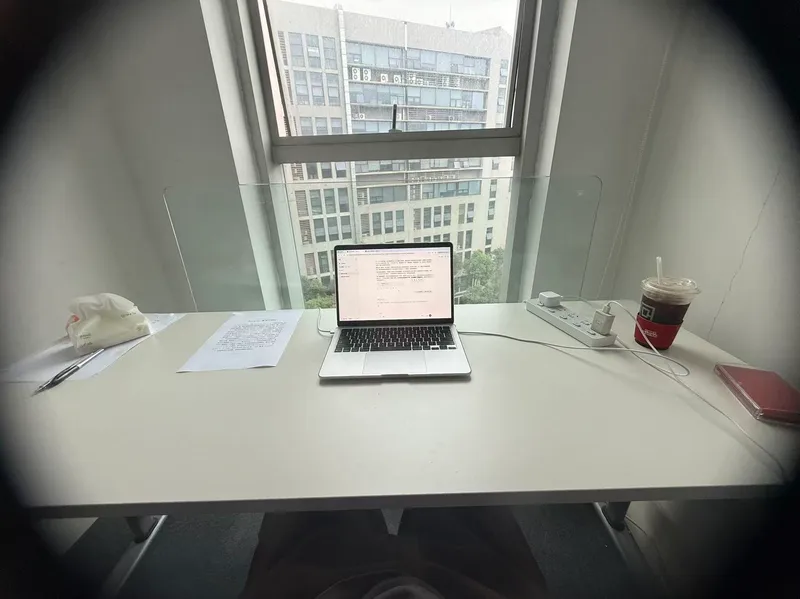
Upload a real room corner photo along with its intended use and budget, and this Skill generates two finished effect renders: a full daytime version and a nighttime version. Using the same camera angle, table, and items, the only difference is light and time—the daytime version relies on window light, while the nighttime version depends on lamp lighting. A cost table is included showing what to buy, individual prices, budget savings, or cut priorities if over budget. No more than three new items are added, all with realistic reference prices. It keeps your existing items, leaves walls, floors, and window placements untouched, maintains the camera angle, and matches your original photo aspect ratio. It does not overwhelm you with ten options to choose from, avoid forcing you to run prompts in other tools, and avoids buzzwords. Who is it for, and who is it not for? It is suited for renters, office desk users, people with clear budgets, and those tired of stock photo websites who just want to know what to buy. It is not suited for whole-house renovations, construction drawings, or adding large furniture. It handles a single corner, not an entire house. Three Hard Rules Do not throw away your things. Unless you explicitly state which item can be discarded, every existing item in the image must be identifiable across both renders. Its default stance is rearrangement first, purchasing second. Do not change hard finishes. Wall colors, flooring, window placements, and corner shapes are locked. It provides soft furnishing solutions, not construction plans. Do not change the camera angle. Both renders share lens parameters and height, and horizontal or vertical framing follows your original photo without unauthorized cropping for aesthetics. How to Use 1. Take a picture. Stand in place and capture the corner lines and countertop edges together, making sure the floor and window are visible. Blurry, overexposed, or floor-only photos may be rejected because the corner scope cannot be determined. 2. Speak. Describe the use, budget, and drilling permissions in one sentence. Missing details are fine as the Skill infers them, but clarity helps. More specific supplementary info yields more precise results: a desk and a display stand with the same wall and light need completely different items. Receive your images. Two images and one table, that is all. 3. For deeper content—a ten-direction style matrix, five progressive schemes across five axes, nine image sets (including main image, original comparison, detail close-ups, flat lay list), nine inspection checklists, and three-lock parameter cards—just ask, and it will expand. It is hidden by default to save credits since most decisions do not require draft processes.
 Image
Old Photo Restoration
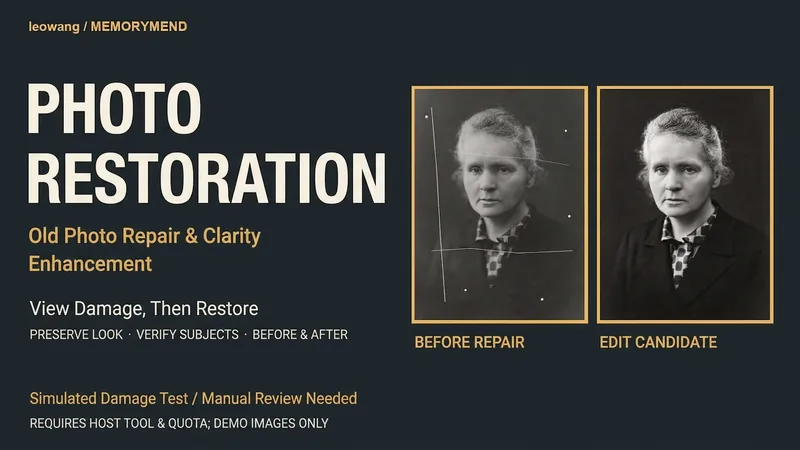
Restore clarity to old photos while preserving their original appearance. Upload a scanned or photographed old photo to first identify scratches, blemishes, fading, and blur, followed by conservative enhancement or generative restoration based on available host tools, while checking the number of people, facial features, clothing, composition, and inscriptions. The original tone is retained by default, with a speculative colorized version noted if requested. A diagnosis and complete prompt are provided when editing tools are unavailable. This workflow was adapted by leowang from an MIT project, with the original license included. An actual editing sample is attached where the input is a public-domain historical portrait with artificially simulated damage, and the clean original image was not sent to the model. Local facial textures may be redrawn with no guarantee of authentic facial feature recovery or that faces remain unaltered. Not test-run within YouMind; tools or model quotas are not included. This candidate removes simulated damage, though fine facial and hair textures show reconstructed changes and require manual review rather than being considered an authentic final version.
Information
- Version
- v9
- Last updated
- Runtime credits
- Usage-based
- Models
- Auto
- Use cases
- Writing & contentImages & designLifestyle & entertainment
- What you get
- DocumentImageDiagram
