
Product Ad Three-Image Studio
One product photo, three matching visuals
Product Ad Three-Image Studio
One product photo, three matching visuals
Showcase
Description
Upload a clear product photo and its exact name. First, choose a visual direction, then create a consistent product hero image, usage scene image, and feature image—three separate 3:4 portrait images by default. Ideal for small brands, e-commerce shop owners, and brand content creators. Preserve the product’s colors, proportions, packaging, key structures, and readable labels. Use only confirmed facts for its selling points. All three images share the same brand guidelines and include corresponding copy, a product consistency check, and a reusable profile. Image generation requires an environment that supports reference-image editing and uses the corresponding generation credits. Confirm the direction and image count first; additional generations require confirmation. Perfect reproduction is not guaranteed. If capabilities are insufficient, deliver clearly labeled planning and prompts rather than pretending images were generated. Try it directly: three mug images in a desktop setting, three storage-box images in lifestyle scenes, or three branded food-packaging images. Does not include ad placement, product listing, or video.
Related Skills
View all Image
ImageAds: Lifestyle Products
Generate natural lifestyle still-life prompts with a touch of daylight for products such as skincare, fabric bags, home goods, and drinkware. Make products feel as if they truly exist in a space by the window, rather than being staged against a plain e-commerce background or in a heavily decorated pastoral setting. Use light from a single window, shadows cast on the wall, and soft ambient reflections to create an approachable feel, paired with warm neutrals such as cream, oatmeal, and light wood. Preserve the product’s own materials, colors, and details; cool-toned products can retain their true colors, with warmth coming only from the surface and background. When people are needed, focus on one natural use action, making the contact between hand and product the source of everyday realism. Outputs typically include composition ideas, ready-to-use English Midjourney prompts, and Chinese ImageGen prompts; you can also request only one type. A single image defaults to a landscape composition, while series tasks help maintain consistency in the product’s appearance and overall visual style. Suitable for advertising stills, product visual exploration, and lifestyle-scene concepts—not promotional copy, technical drawings, finished TV commercials, or simple product categorization.

IP Visual Studio Max
One image isn’t the problem. The question is: a year from now, will all 100 of your images still look like the same IP? IP Visual Studio Max helps you build a visual system you can reuse over the long term: a complete IP visual profile, an individual visual master template for each of 3–5 content series, character assets when you have an established character or personal image, and series content planning. Three stages: build the foundation first, then create sample designs Max is not a tool that generates images immediately. It first establishes the fundamentals: **Stage 1: Build your visual profile** Collect your complete IP visual DNA across 10 fields, including tone words, color palette, typeface feel, visual identity or alternatives, and more. Define character assets when you have an established personal image or character. Once the profile is complete, you’ll receive a portable DNA summary that you can save yourself. This is your asset, not a platform memory. **Stage 2: Build your series system** Organize 3–5 content series and create an independent visual master template for each one, covering the primary colors, composition, text style, and information-density rules. Establish adaptation rules for different platforms. **Stage 3: Create sample designs** Create the first representative sample for each series through the complete process: copy lock-in → visual blueprint approval → text-free base image → layout instructions. Once a sample is approved, it becomes the standard for all future content in that series. **Text-layer delivery** The standard delivery is a text-free base image plus layout instructions. You add the text using the tools you’re familiar with. If the host platform is verified to support deterministic text overlays, a precisely typeset final design may also be provided—but this is not a default feature. **About DNA archiving** Each time you confirm your DNA or series system, you’ll receive a portable summary. Bring it with you next time to restore the visual rules you’ve already confirmed. This is not the platform’s automatic, permanent memory—it is a long-term visual asset that you own. **Who it’s for** - Creators who are already publishing but lack a consistent visual style and want to organize it systematically - Knowledge-based creators who want to establish fixed content series and update them over the long term - Creators who need to hand visual guidelines to collaborators, with their personal IP as the starting point - Creators who have used Pro and want to build a more complete asset system on top of it **Not included** - Automatically typeset Chinese designs with perfectly integrated text (standard delivery is a text-free base image + layout instructions) - The platform’s automatic, permanent cross-task DNA archiving (a portable summary is provided for you to keep) - Replacing content operations strategy and decision-making - Rapid batch image generation (each image must go through the confirmation process) - Unlimited usage - Bundled plans, discounts, or package deals
 Image
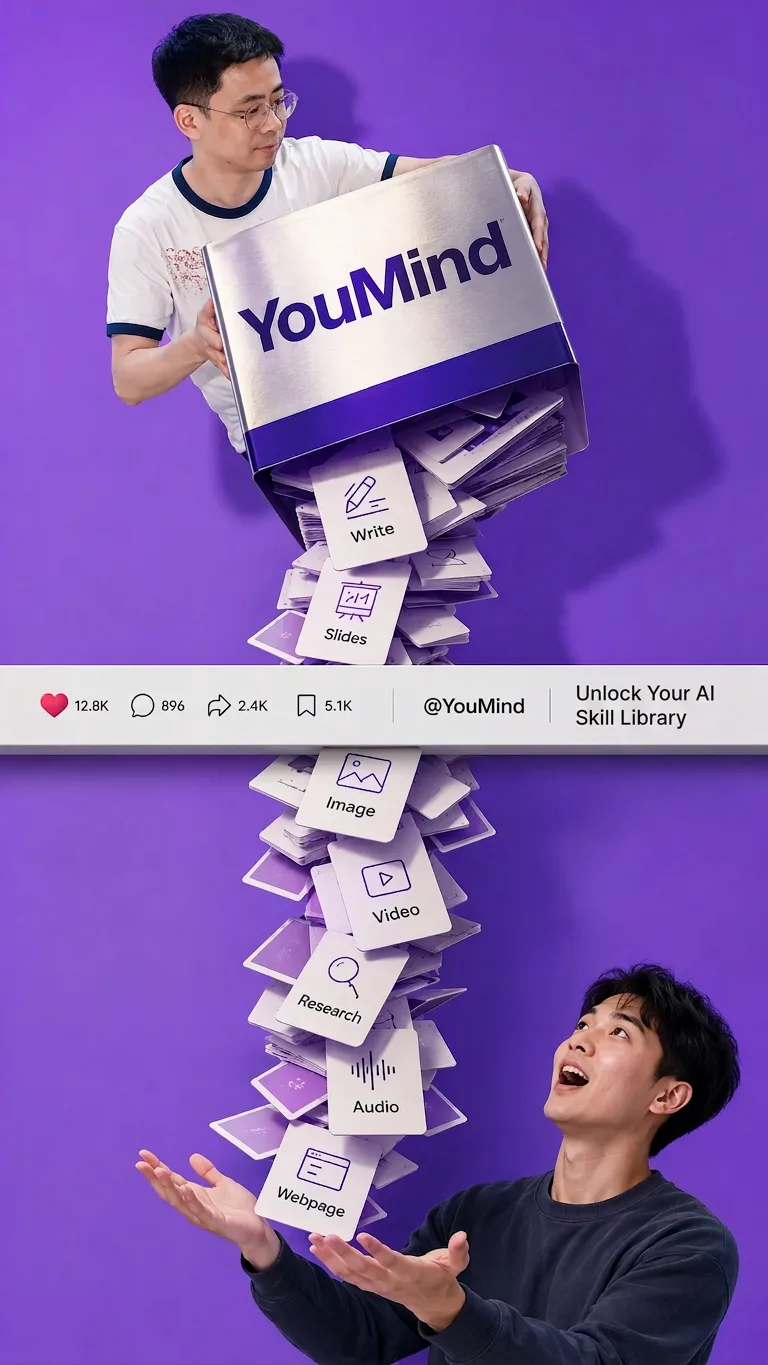
ImageSocial Feed Giant-Pour Poster
This Skill was created by 【Image Generation Skill · Grandmaster】 (https://youmind.com/skills/reference-image-skill-builder-RqmjHpF6UHmyjg), with production-ready results! Want your own image-generation Skill? Install 【Image Generation Skill · Grandmaster】 and build your own image-generation Skill! Turn beverages, FMCG products, physical products, or B2B concepts into vertical commercial ad posters with strong visual impact: enlarge the branded product into a “giant” far larger than the person, angled forward from above, while liquids, ice cubes, fruit pulp, paper slips, or physical contents continuously pour downward through the social media interface strip across the center of the image, finally landing in a person’s open mouth, outstretched hands, basket, or other receiving object. You can provide the subject category, brand name, product, contents, receiving method, and preferences such as background color, aspect ratio, giant-product scale, and ad copy. If unspecified, the concept defaults to a beverage or FMCG direction. The generated image uses a three-part vertical composition, with a horizontal strip of likes, comments, shares, and other social media information running across the center to reinforce the concept of “content passing through the interface.” It also combines liquid highlights, ice refraction, paper’s matte finish, or metallic reflections with soft studio lighting, clear shadows, and a realistic commercial advertising look. It is suited to new product launches, social media advertising, brand concept proposals, beverage and FMCG marketing, and creative visual expression for physical and industrial products. The result focuses on continuous pouring, giant-product proportions, readable brand text, visual depth, and the structure of the person’s hands and mouth, while reducing broken streams, impossible gravity, incorrect text, and distorted social media interfaces.
Information
- Version
- v4
- Last updated
- Runtime credits
- Usage-based
- Models
- Auto
