xiaoxiaodong P149 | Flat Art
By xiaoxiaodong
Description
Recommended by
淡苍
Why we love this skill
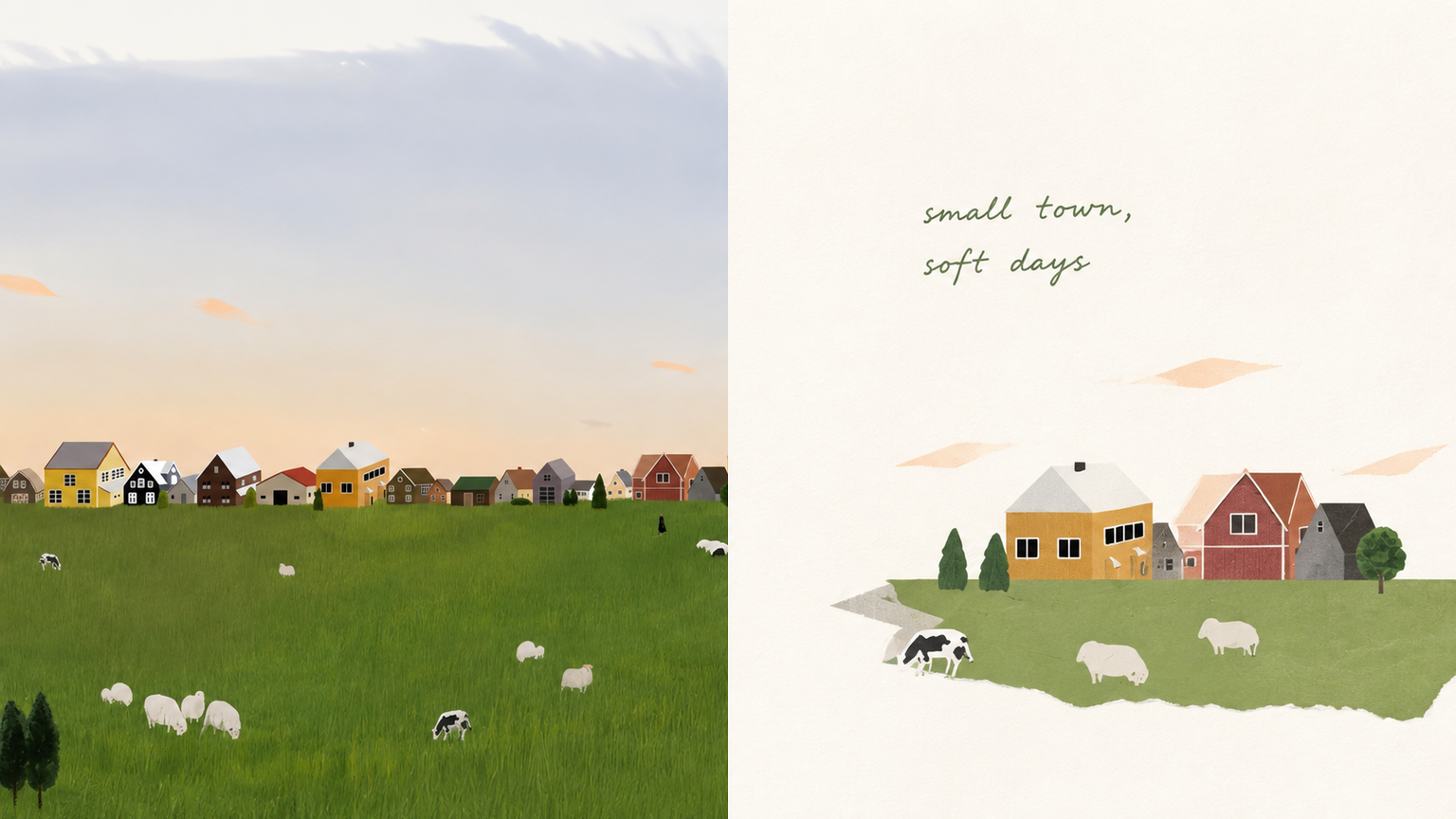
Transforms photos into hand-drawn textured flat designs with a strict half-and-half layout pairing the real image with its artistic reconstruction. Supports varied layouts, batch processing, and wallpaper formats, with careful attention to whitespace, text standards, and per-image quality checks.
Suitable for organizing personal photography, independent publishing, exhibition practice, and lifestyle visual work. Even when the original image has an ordinary composition, a cluttered background, or a small subject, you can reestablish a focal point through reduction, recombination, cropping, and changes in scale—instead of simply applying a filter to the photo. In the second half, extract only the most recognizable subject, contours, structures, gestures, and narrative relationships from the photo, then reconstruct them as a hand-drawn, textured flat illustration. Do not copy the photo in full, redraw every object literally, or retain a cluttered background. Actively remove most irrelevant information, keeping only the visual memory points that best represent the original objects and theme. Through further reduction, recombination, cropping, changes in scale, and negative space, re-direct the original image into a more coherent finished work.
Related Skills
View all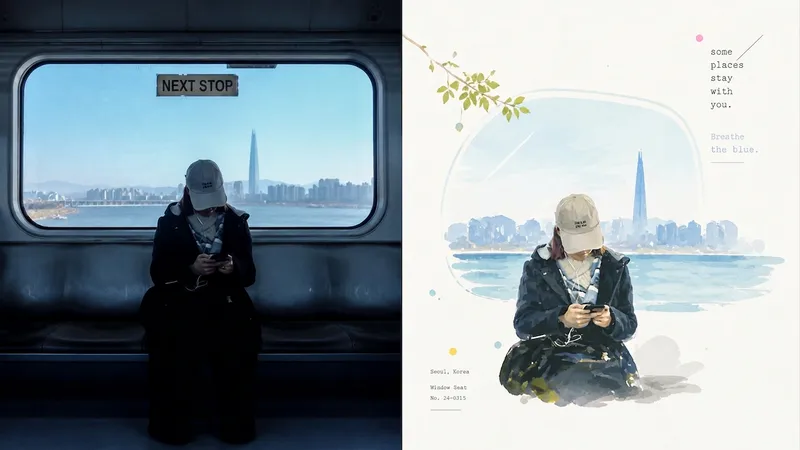 Image
ImageXiaoxiaodong x P070
The P070 skill keeps only the most memorable subject, pose, relationships, and metaphors from a photo, then reorganizes them with hand-drawn outlines, bright impasto, or translucent color blocks. Subjects at a small or medium scale are placed within generous warm-white negative space, while restrained grids, spray dots, glows, and geometric marks provide editorial accents. Fine typewriter-style text is composed alongside the image rather than layered over the finished artwork. Works well when The subject must remain recognizable: The identity of people, buildings, animals, plants, objects, or landscapes should not be replaced by generic color patches. You want vivid without looking cheap: Colors are remixed from the photo’s brightest, most lively tones—without muddy gray filters or piles of candy colors. You need a professional layout: A small-scale subject, bright negative space, directional cues, and restrained small text work together to set the visual rhythm. You need flexible deliverables: Supports top/bottom, left/right, design-only, multiple aspect ratios, and four-edge wallpapers, as well as batch processing for image directories.
 Image
ImageXiaodong x Paper Collage P077
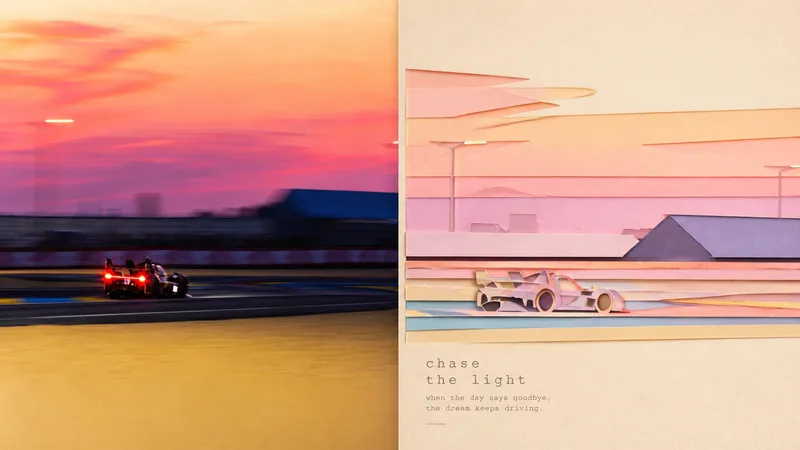
Panel 077 distills the subject, character movement, contour structure, and scene relationships into a paper-cut collage: crisp cut-paper outlines, layered foreground and background shapes, subtle paper grain, cut edges, and soft shadows work together to create a sense of space. The background is deliberately simplified, while pastel colors are remixed from the most vibrant and emotionally resonant parts of the photo. The result feels more like a high-end travel magazine or independent art publication than a collage of cartoon stickers. Great for these situations Want to turn travel photos into paper-art publications: Not by simply shrinking the photo, but by reorganizing the relationship between the subject and the scene. Need a flat design with convincing depth: Cut-paper edges, layered elements, and soft shadows create a tactile feel without heavy plastic-like 3D. Prefer something soft, bright, and refined: Pastel colors are generated from the original image’s vitality and emotional warmth rather than applying a fixed candy-color palette. Need flexible delivery: Supports top-and-bottom, left-and-right, pure design, multiple aspect ratios, and four-edge wallpapers, along with batch processing for image directories.
Xiaoxiaodong × Collage P093
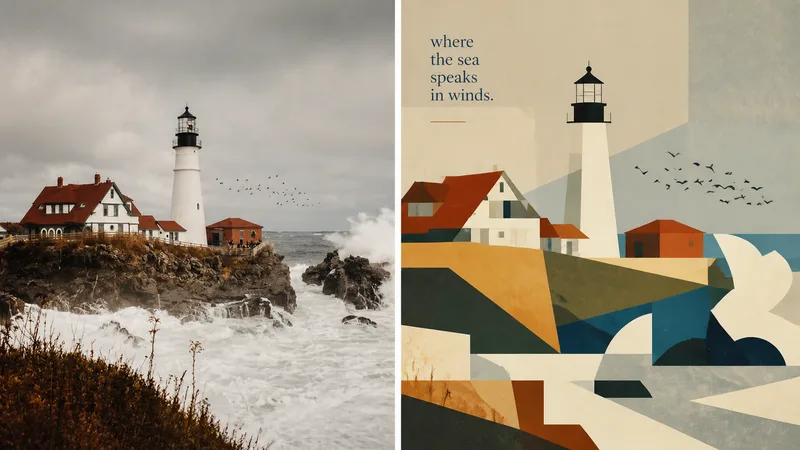
Panel 093 preserves the subject, contours, pose, and narrative relationships from a photo, then distills them into rectangles, trapezoids, triangles, circles, and a small number of freeform planes. Space is created not through realistic perspective or complex shadows, but through occlusion, changes in scale, layered color blocks, and positional relationships. Bright colors, lightly hand-drawn edges, and a matte gouache texture give the result both the flatness of paper cutouts and the polish of an independent publication. Suitable for these situations Want to make a complex photo instantly readable: Merge repeated elements while preserving the key identity-defining features with as few shapes as possible. Need vivid yet sophisticated colors: Start with the brightest, most memorable colors in the original image, then reorganize them into a limited, clear palette of combined color blocks. Seeking a refined modernist simplicity: Use flat space, lightly irregular edges, and a matte gouache/acrylic finish to avoid a glossy vector look or template-like feel. Need flexible delivery: Supports top-to-bottom, left-to-right, design-only, multiple aspect ratios, and four-edge wallpapers, as well as batch processing for image directories.
xiaoxiaodong P149 | Flat Art
By xiaoxiaodong
Description
Recommended by
淡苍
Why we love this skill
Transforms photos into hand-drawn textured flat designs with a strict half-and-half layout pairing the real image with its artistic reconstruction. Supports varied layouts, batch processing, and wallpaper formats, with careful attention to whitespace, text standards, and per-image quality checks.
Suitable for organizing personal photography, independent publishing, exhibition practice, and lifestyle visual work. Even when the original image has an ordinary composition, a cluttered background, or a small subject, you can reestablish a focal point through reduction, recombination, cropping, and changes in scale—instead of simply applying a filter to the photo. In the second half, extract only the most recognizable subject, contours, structures, gestures, and narrative relationships from the photo, then reconstruct them as a hand-drawn, textured flat illustration. Do not copy the photo in full, redraw every object literally, or retain a cluttered background. Actively remove most irrelevant information, keeping only the visual memory points that best represent the original objects and theme. Through further reduction, recombination, cropping, changes in scale, and negative space, re-direct the original image into a more coherent finished work.
Related Skills
View allImageXiaoxiaodong x P070
The P070 skill keeps only the most memorable subject, pose, relationships, and metaphors from a photo, then reorganizes them with hand-drawn outlines, bright impasto, or translucent color blocks. Subjects at a small or medium scale are placed within generous warm-white negative space, while restrained grids, spray dots, glows, and geometric marks provide editorial accents. Fine typewriter-style text is composed alongside the image rather than layered over the finished artwork. Works well when The subject must remain recognizable: The identity of people, buildings, animals, plants, objects, or landscapes should not be replaced by generic color patches. You want vivid without looking cheap: Colors are remixed from the photo’s brightest, most lively tones—without muddy gray filters or piles of candy colors. You need a professional layout: A small-scale subject, bright negative space, directional cues, and restrained small text work together to set the visual rhythm. You need flexible deliverables: Supports top/bottom, left/right, design-only, multiple aspect ratios, and four-edge wallpapers, as well as batch processing for image directories.
ImageXiaodong x Paper Collage P077
Panel 077 distills the subject, character movement, contour structure, and scene relationships into a paper-cut collage: crisp cut-paper outlines, layered foreground and background shapes, subtle paper grain, cut edges, and soft shadows work together to create a sense of space. The background is deliberately simplified, while pastel colors are remixed from the most vibrant and emotionally resonant parts of the photo. The result feels more like a high-end travel magazine or independent art publication than a collage of cartoon stickers. Great for these situations Want to turn travel photos into paper-art publications: Not by simply shrinking the photo, but by reorganizing the relationship between the subject and the scene. Need a flat design with convincing depth: Cut-paper edges, layered elements, and soft shadows create a tactile feel without heavy plastic-like 3D. Prefer something soft, bright, and refined: Pastel colors are generated from the original image’s vitality and emotional warmth rather than applying a fixed candy-color palette. Need flexible delivery: Supports top-and-bottom, left-and-right, pure design, multiple aspect ratios, and four-edge wallpapers, along with batch processing for image directories.
Xiaoxiaodong × Collage P093
Panel 093 preserves the subject, contours, pose, and narrative relationships from a photo, then distills them into rectangles, trapezoids, triangles, circles, and a small number of freeform planes. Space is created not through realistic perspective or complex shadows, but through occlusion, changes in scale, layered color blocks, and positional relationships. Bright colors, lightly hand-drawn edges, and a matte gouache texture give the result both the flatness of paper cutouts and the polish of an independent publication. Suitable for these situations Want to make a complex photo instantly readable: Merge repeated elements while preserving the key identity-defining features with as few shapes as possible. Need vivid yet sophisticated colors: Start with the brightest, most memorable colors in the original image, then reorganize them into a limited, clear palette of combined color blocks. Seeking a refined modernist simplicity: Use flat space, lightly irregular edges, and a matte gouache/acrylic finish to avoid a glossy vector look or template-like feel. Need flexible delivery: Supports top-to-bottom, left-to-right, design-only, multiple aspect ratios, and four-edge wallpapers, as well as batch processing for image directories.
Find your next favorite skill
Explore more curated AI skills for research, creation, and everyday work.