Social Ranking Card Maker
Build ranking cards with titles and tags.
Social Ranking Card Maker
Build ranking cards with titles and tags.
Showcase
Description
This Skill turns a topic into ranking graphics with clear comparison angles and reasons behind each rank. Enter a theme such as “childhood snacks,” “hot pot,” or “cities known for street food.” You can also specify the TOP count, visual style, and sorting criteria. The Skill first identifies a worthwhile comparison, organizes the list and supporting rationale, then creates the cards with 1 recommended title, 2 alternate titles, a description, and tags. Visual style and layout adapt to the topic; long rankings are split into cards for easier phone reading. You can also preview the topic direction or text first. The example is “National Childhood Snacks TOP10”: cute hand-drawn cards ask, “Where does your number one rank?” to invite readers to compare their childhood favorites. Subjective recommendations explain the criteria; data-based rankings retain the source, reporting period, and unit. For creators making Xiaohongshu and general social graphics. The runtime environment must support the relevant search and image-generation capabilities. A complete local Codex example is currently available; YouMind-side operation still needs testing. Layered illustration source files are not included.
Recommended by
Dancang
Why we love this skill
Turns a category into a ranking people can compare, with clear criteria, visual cards, and ready-to-publish copy—while distinguishing subjective recommendations from verified data.
Related Skills
View all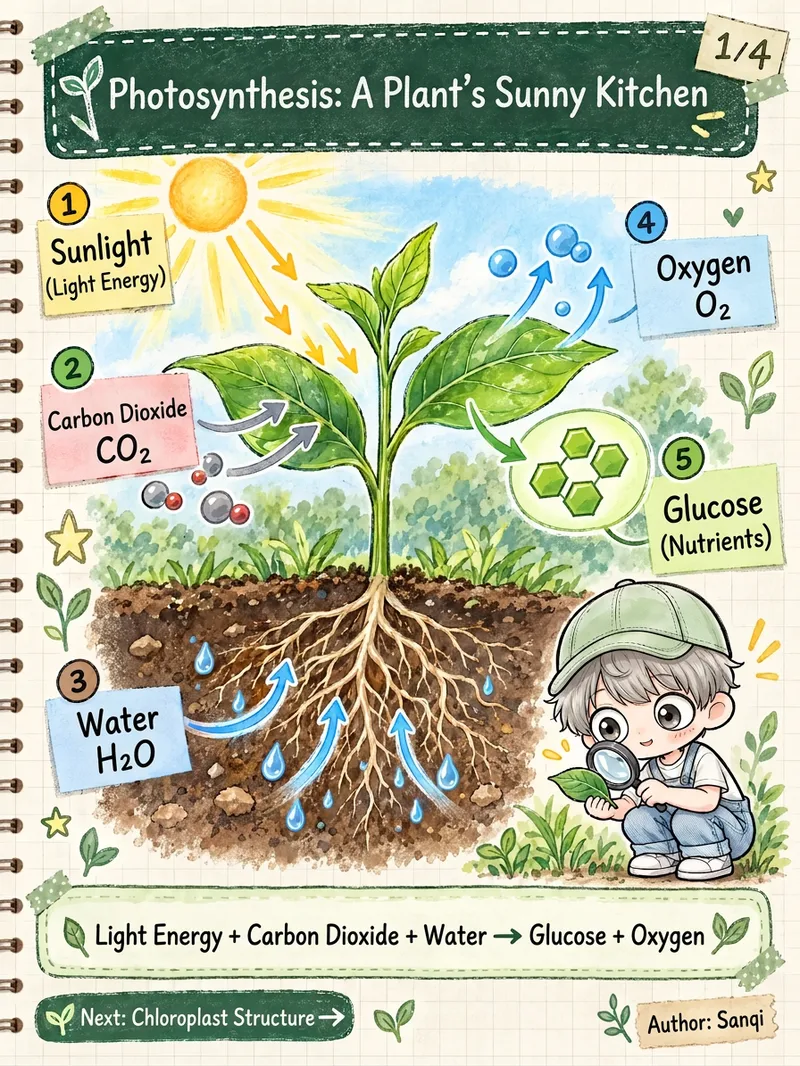 Image
Science Illustration Series
This skill takes a single topic and delivers a complete set of ready-to-publish science infographics rather than isolated single images. What it can do: - Automated series planning: Overview -> Structure -> Principle -> Connections and Summary. Each image covers one clear point, complete with page numbers, unified color palettes, and "Next" previews. - Fact-checking before drawing: Organizes a fact checklist first, verifying process order, arrow directions, and spatial orientation. Uncertain numbers are omitted or marked as "approximate" rather than guessed. - Multilingual localization: Supports Simplified Chinese, Traditional Chinese, Japanese, Korean, English, Spanish, French, German, Portuguese, and more. It rewrites content naturally for local audiences rather than direct translation, adapting terminology, punctuation, and grade-level labels. - Unified style: Cream-colored notebook paper, dark green chalkboard headers, washi tape, sticky notes, hand-drawn annotations, and realistic scientific illustrations. Pastel and dark chalkboard variants are also available. - IP-free by default: Keeps visuals clean. To add a mascot, simply upload a character image or text description to keep the character consistent across the entire set. - Aspect ratios: Default is 3:4, with support for 9:16, 4:5, 1:1, and 16:9. - Model matching: Defaults to top-tier image quality settings, switchable for strong consistency, pure Chinese output, or fast drafts. - Exportable prompts: Complete prompts for each image can be copied directly for use in other tools. Best for: - Science graphic creators on platforms like Instagram, TikTok, and Xiaohongshu - Teachers and educational institutions making slide decks, review cards, and knowledge posters - Global creators managing multilingual accounts - Content teams looking to batch-produce science series Suitable topics: - Human body and health (circulation, digestion, immunity, sleep), biology and nature, physics and chemistry, earth and universe, history and culture, tech and AI basics. Notes: - Health content is for educational purposes only and does not constitute medical advice, diagnosis, or dosage instructions; local-language disclaimers will appear on the graphics. - AI image generators may occasionally make errors with small text, so the skill checks images one by one with automatic retries. A final review before publishing is recommended. - Generates 3-4 images at a time; additional content can be created as a second series.
Xiaohongshu Hand-Drawn Infographics
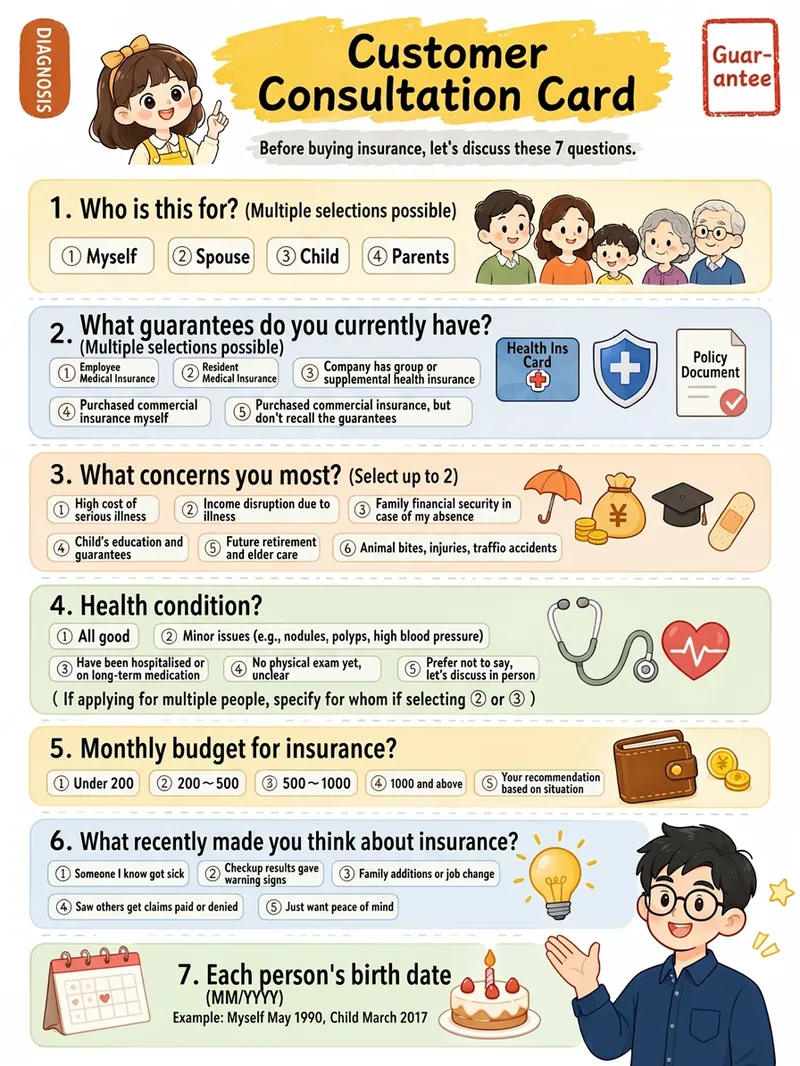
Provide a complete piece of copy, choose the number of images and an aspect ratio (3:4 / 1:1 / 16:9), and generate Xiaohongshu infographics in a “hand-drawn knowledge card” style. The Skill includes a consistent visual system: bright, translucent pure-white paper texture with fine fibers, minimal speckling, and a clean, airy feel; bright yellow hand-drawn brush lettering for main titles; a gray brush-stroke subtitle band; a red stamp in the upper-right corner; a vertical capsule-shaped color label in the upper-left corner; colorful rounded module panels; and newly designed flat vector hand-drawn cartoon characters, along with a rich variety of icons and charts. During processing, it first organizes a “typesetting copy draft” that preserves the full text word for word for your confirmation. Once confirmed, it generates the images. Each module includes an icon or chart, keeping the visuals clear and readable while adding artistic character.
 Image
Two-Tone Halftone Overprint
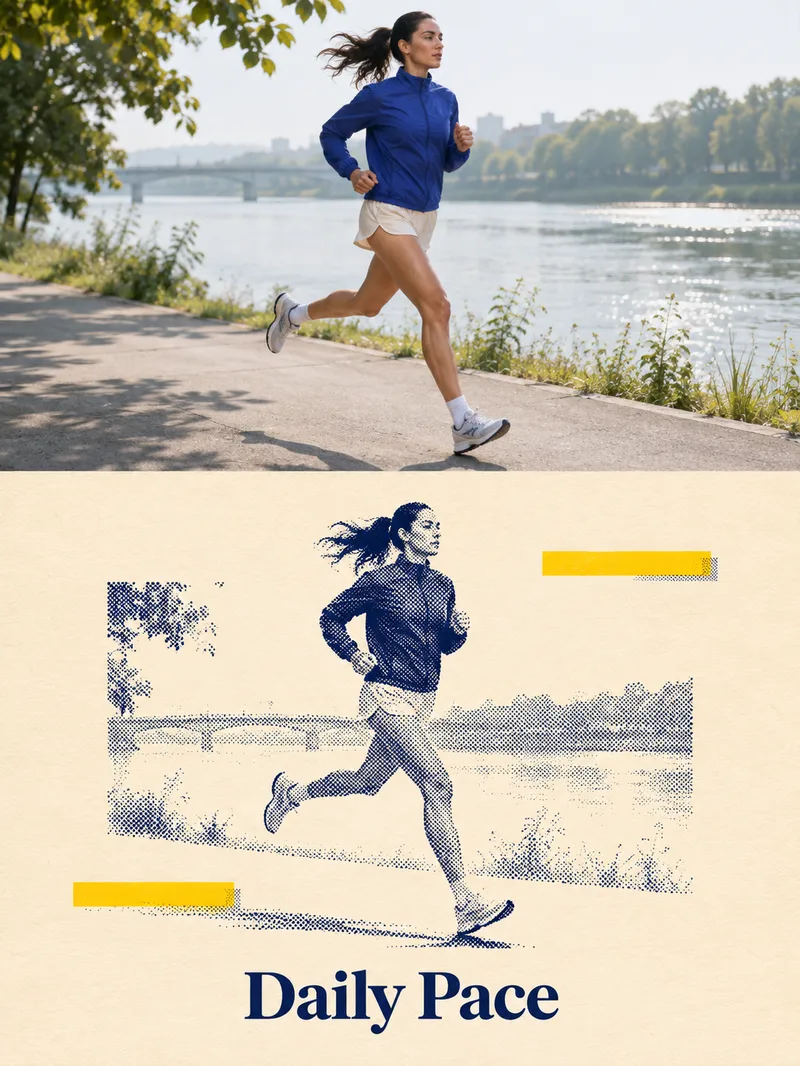
Ideal for creators making social media graphics, editorial posters, and personal visual exercises. Provide a subject such as a person, pet, building, or still life, and optionally specify a title and color scheme. Photo mode requires authorized, clear, and readable images. The skill first identifies the subject and essential outlines, planning a vertical diptych layout: the top features natural photography, while the bottom uses dark blue halftones of varying density for light and shadow, paired with a warm white paper texture, subtle yellow geometric blocks, and a short title. It then uses the current environment's image tools to generate and review the result. Delivers an actual poster, title text, and verification notes, with copyable prompts included when needed. Usage: Enter a subject or photo, specify the title and purpose, then review the subject, text, and composition after running, and request specific adjustments. The four display images are AI examples generated locally following the full skill visual method: an adult runner, an orange cat, a fictional building, and an unbranded coffee pot, and are not actual photos or real client cases. The avatar was generated separately based on the local halftone cat case, showing visual effects and Chinese titles. YouMind integration and uploaded photo editing have not been tested in practice; details, halftone thickness, whitespace, and subject size may vary. The runner example retains more background, and exact consistency per run is not guaranteed. Text planning can use GPT, while image creation relies on the actual image tools provided by the runtime environment. The local image_gen did not return a specific model ID, and no binding to Image2 is claimed. Without image tools or if generation fails, image delivery is incomplete, and only pending prompts can be provided. Verify text, portrait rights, and product structure before official use; exact identity or detail consistency is not guaranteed, and automatic publishing or purchasing is not supported.
Information
- Version
- v3
- Last updated
- Runtime credits
- Usage-based
- Models
- GPT Image 2.5 Flare
