Grok ImaginePrompts

Updated daily

Total: 435
Featured

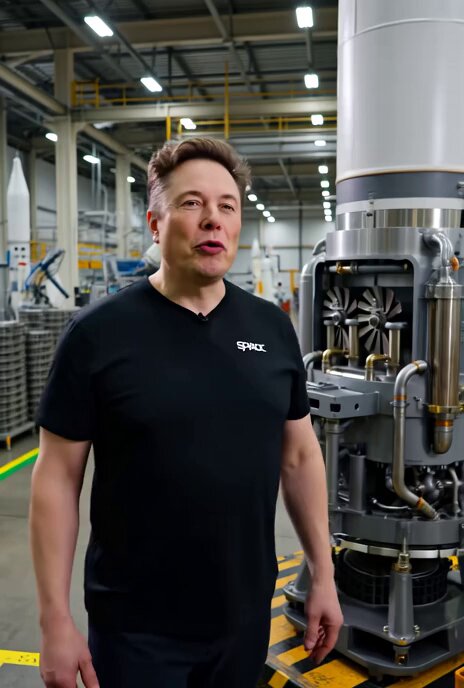
Elon Musk Explaining Oxygen Circulation in SpaceX Engine

A Grok Imagine prompt instructing the generation of a video featuring Elon Musk explaining oxygen circulation inside a SpaceX engine.

Featured

Grok Imagine prompt for Hachiko's life video

A detailed prompt for Grok Imagine requesting a realistic cartoon style video depicting the true story of Hachiko's life in 1920s Tokyo, including his adoption, daily walks, Professor Ueno's death, and Hachiko's faithful wait.

Featured

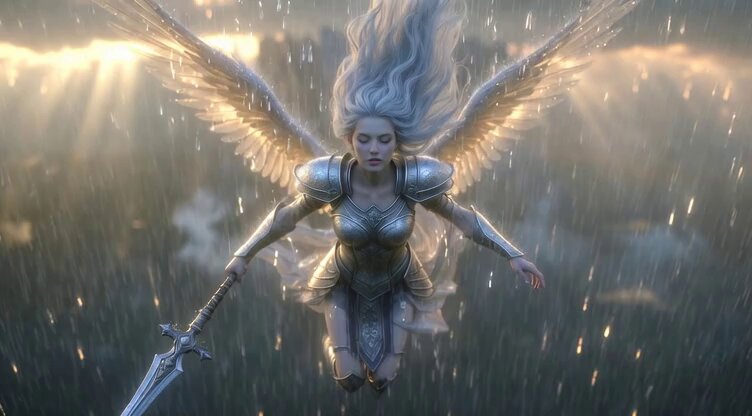
Video generation prompt: Celestial Valkyrie descending to Earth in the rain

A detailed prompt for Grok Imagine describing a mystical and noble celestial Valkyrie with long silver hair and shining armor, holding a holy spear, descending to Earth in the rain, emitting a solemn and sacred aura as she falls from Valhalla.

Philosophical reflection on belief systems

A philosophical reflection on how our belief systems act as a mirror, showing us only what we want to see and hear. This text was used to generate a video via Grok Imagine.

Chinese Xianxia Goddess Twin Statue Video

A detailed prompt for generating a video featuring a Chinese Xianxia goddess theme, focusing on a twin statue composition with a petite fairy holding a golden phoenix staff in the foreground and a giant shadow goddess in the background, emphasizing high quality and photorealism.

Cyberpunk Anime Woman Portrait in 90s OVA Style

This is a highly detailed, complex prompt intended to generate a video of a cyberpunk anime woman's portrait, rendered in the specific aesthetic of 1990s OVA cel animation, combining styles from Ghost in the Shell and Serial Experiments Lain, emphasizing analog noise, volumetric shadows, and a cold color palette.

Ultra-realistic high fashion studio beauty portrait video prompt

A detailed prompt for Grok Imagine to generate a video of an ultra-realistic, high-fashion studio beauty portrait of a young woman, focusing on tight framing, centered composition, and professional camera settings (85mm lens, f/4, shallow depth of field).

Hyperrealistic Cinematic Shot of Giant Soap Bubbles

A prompt for Grok-Imagine to generate a hyperrealistic, cinematic video shot during summer midday. The scene features a park fountain area where a child is blowing normal soap bubbles, which are suddenly overshadowed by enormous, beach-ball-sized soap bubbles.

Grok Imagine multi-step video prompt for Saint Patrick’s Day

A multi-step Grok Imagine prompt sequence: first, an image prompt for a woman in a futuristic space suit, followed by two video prompts to generate motion—the woman blowing bubbles, and then extending the video where trees grow as the bubbles hit the ground.

Epic Marvel Avengers Style Video Prompt for Grok Imagine

This is a detailed, multi-part prompt structure designed to generate an epic, cinematic Marvel Avengers-style movie trailer video using Grok Imagine, specifically tailored for a character like Saint Patrick. It requires reference images for character consistency and includes distinct sections for the beginning, action scene, and dynamic ending cinematography.

Skier Jump with Polaroid Drone Style

A Grok Imagine prompt specifying a video of a skier going off a jump, filmed in a drone-style camera movement while maintaining a polaroid aesthetic.

Transform image into Art Deco metropolis scene

A prompt instructing Grok Imagine to transform an uploaded image into a stylized Art Deco metropolis scene, preserving the identity and pose of the subject while applying a 1920s–1930s cinematic cityscape style. This requires an input image.

Loading more videos...

Common Questions

Grok Imagine is xAI's AI video generation model powered by the Aurora architecture. It supports text-to-video and reference-to-video with up to 7 reference images, delivering cinema-grade quality. It is ranked #1 in the Artificial Analysis Video Arena.
Grok Imagine excels at reference-to-video generation, allowing you to provide up to 7 images as visual references. Its Aurora model architecture delivers exceptional temporal coherence, dynamic camera movements, and accurate subject consistency across frames.
Browse the prompt wall, watch the auto-playing clips, and tap the info icon on any card to see the full prompt. Copy it and paste it into YouMind with the Grok Imagine model selected to generate your own video.
Start with a clear scene description, specify camera movement (e.g. 'slow dolly in'), define lighting and mood, then add subject details. For reference-to-video, provide high-quality reference images that clearly show your desired subjects or style. The model excels at maintaining consistency with reference materials.